
Best Remove.bg Alternatives in 2026: 5 Tools Tested & Compared
Updated: October 2026 • 10 min read
According to an official announcement published by remove.bg, "remove.bg's background removal is moving to Canva. The standalone website will no longer be available from 1 December 2026 at 9:00am CET".
For years, the standalone portal served as the go-to tool for quick cutouts. Following its announced move to Canva, teams are actively seeking a reliable remove.bg alternative ahead of the transition.
To provide clear guidance, we evaluated five tools in side-by-side benchmarks using two practical test cases: an e-commerce product with surface reflections and water refractions, and a multi-object indoor scene requiring selective extraction.
Quick Picks: Which Tool Fits Your Workflow?
Here is how the top remove.bg alternatives align with specific production needs based on our physical test findings:
- Best for E-Commerce & High-Precision Cutouts: ImageCombiner AI Background Remover delivers smooth, clean borders on product photography without tabletop reflection artifacts, with optional prompt control for complex multi-object scenes.
- Best for Creative Cloud Workflows: Adobe Firefly remains a natural fit for teams already subscribed to Adobe tools who prioritize shared cloud libraries.
- Best for Fast, No-Fuss Edits: Clipdrop provides a simple, lightweight drag-and-drop page for quick one-off cutouts.
- Best for Social Media Layouts and Marketing Templates: Picsart pairs background removal with an extensive library of templates, stickers, and promotional typography.
Free trial credits on signup · Test prompt guidance and edge precision
Test Case 1: Isolating Product Frames from Surface Reflections
On polished studio surfaces, contact reflections often share similar color, brightness, and texture with the physical object resting above them. In this benchmark, the test sample features sunglasses placed on a glossy blue surface with water puddles, challenging each model to distinguish solid frames and tinted lenses from specular reflections and liquid refractions.
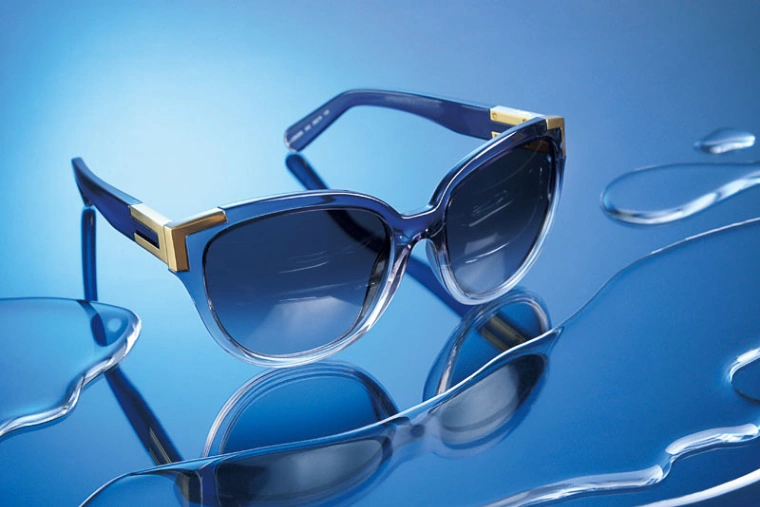
(Figure 1: Original test sample featuring sunglasses, contact reflections, and water puddles).
1. remove.bg

(Result from remove.bg)
- Observation: The cutout left the surface reflections beneath both temple arms intact, as well as a reflection artifact along the lower-right frame rim. When zooming in on high-contrast edges, the outer borders also showed slight stepping along curved contours in this test. Removing the remaining reflection artifacts requires manual cleanup before placing the item on an isolated catalog background.
2. Adobe Firefly
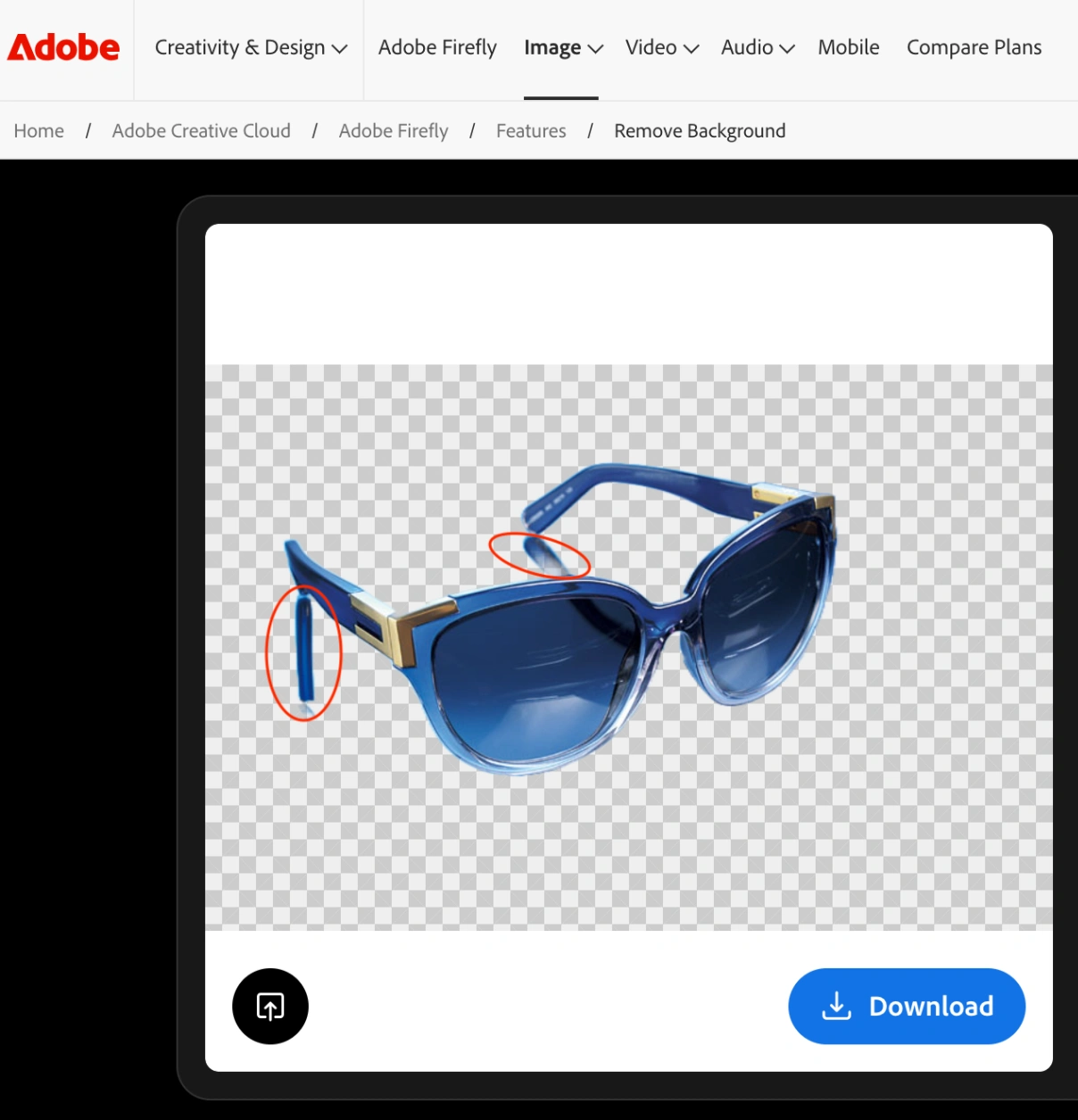
(Result from Adobe Firefly)
- Observation: The automated cutout from Adobe Firefly retained the tabletop reflections beneath both temple arms. Because the engine identified the contact reflections as part of the primary subject, manual touch-up using an eraser or selection tool is needed to separate the frames.
3. Clipdrop
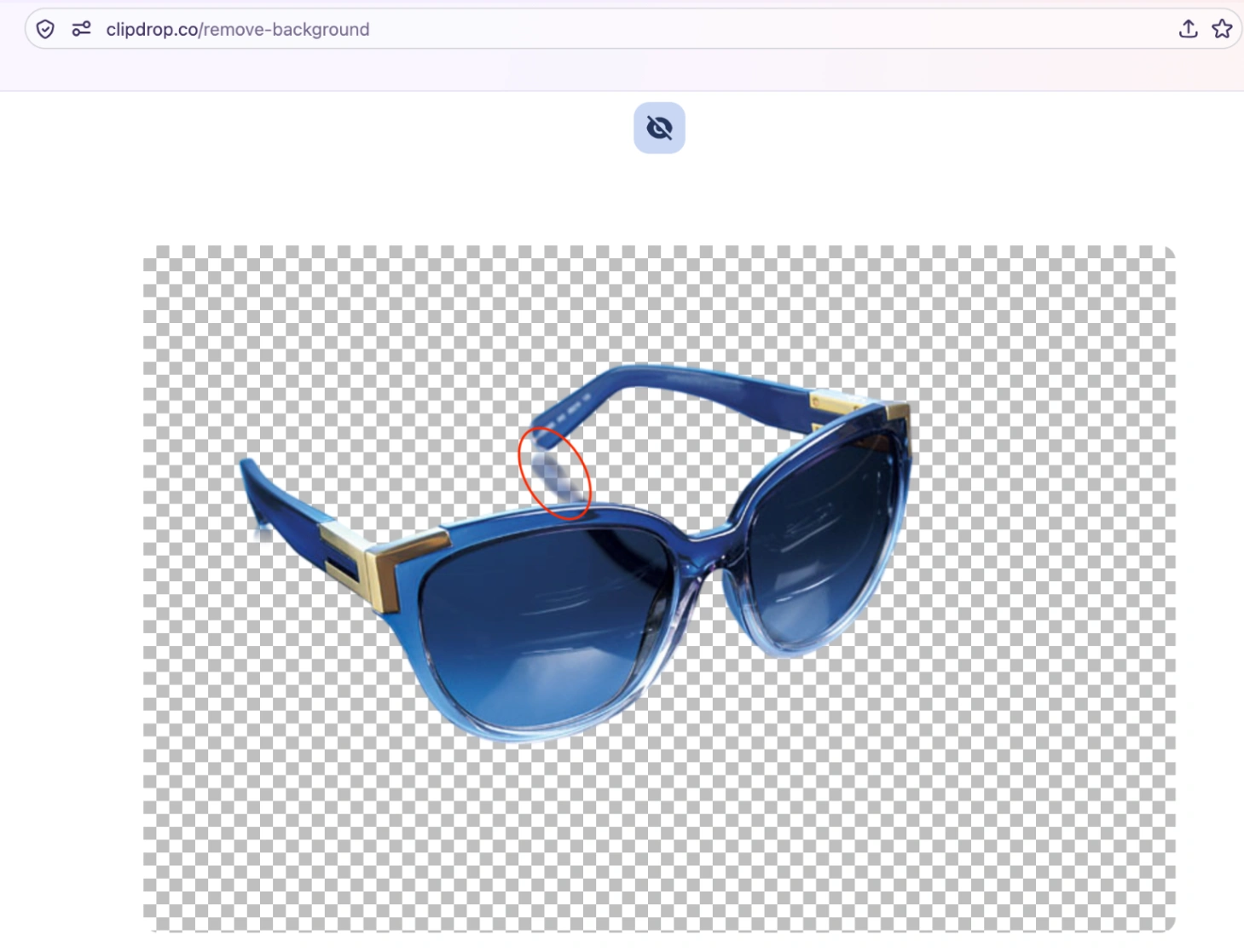
(Result from Clipdrop)
- Observation: The output showed an asymmetrical result. The reflection under the left temple arm was removed cleanly, while the reflection under the right temple arm remained visible on the table plane.
4. Picsart
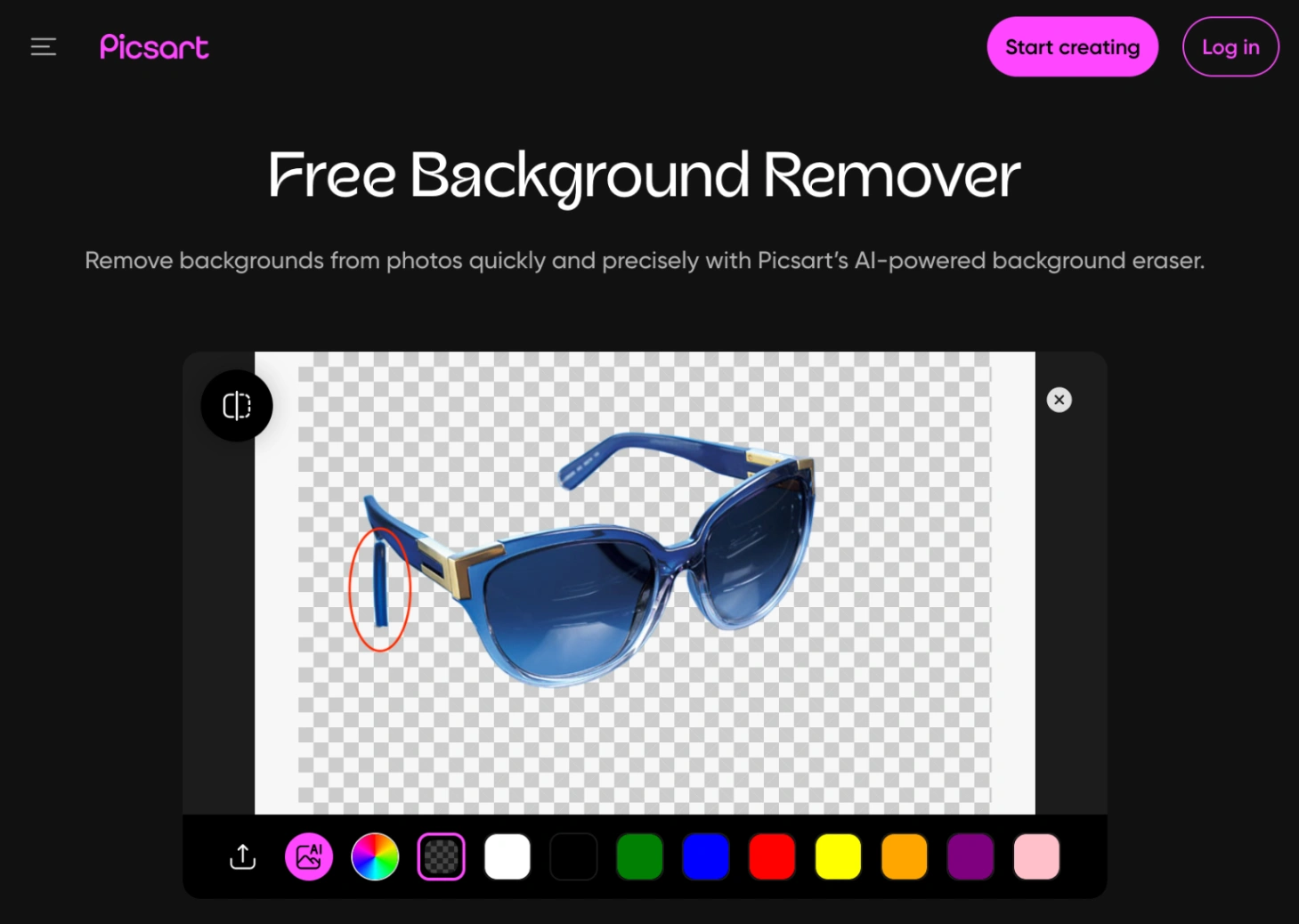
(Result from Picsart)
- Observation: Picsart removed the reflection on the right side, but retained a visible reflection fragment beneath the left temple arm. The outer contour also displayed a softer finish along the frame edges.
5. ImageCombiner AI
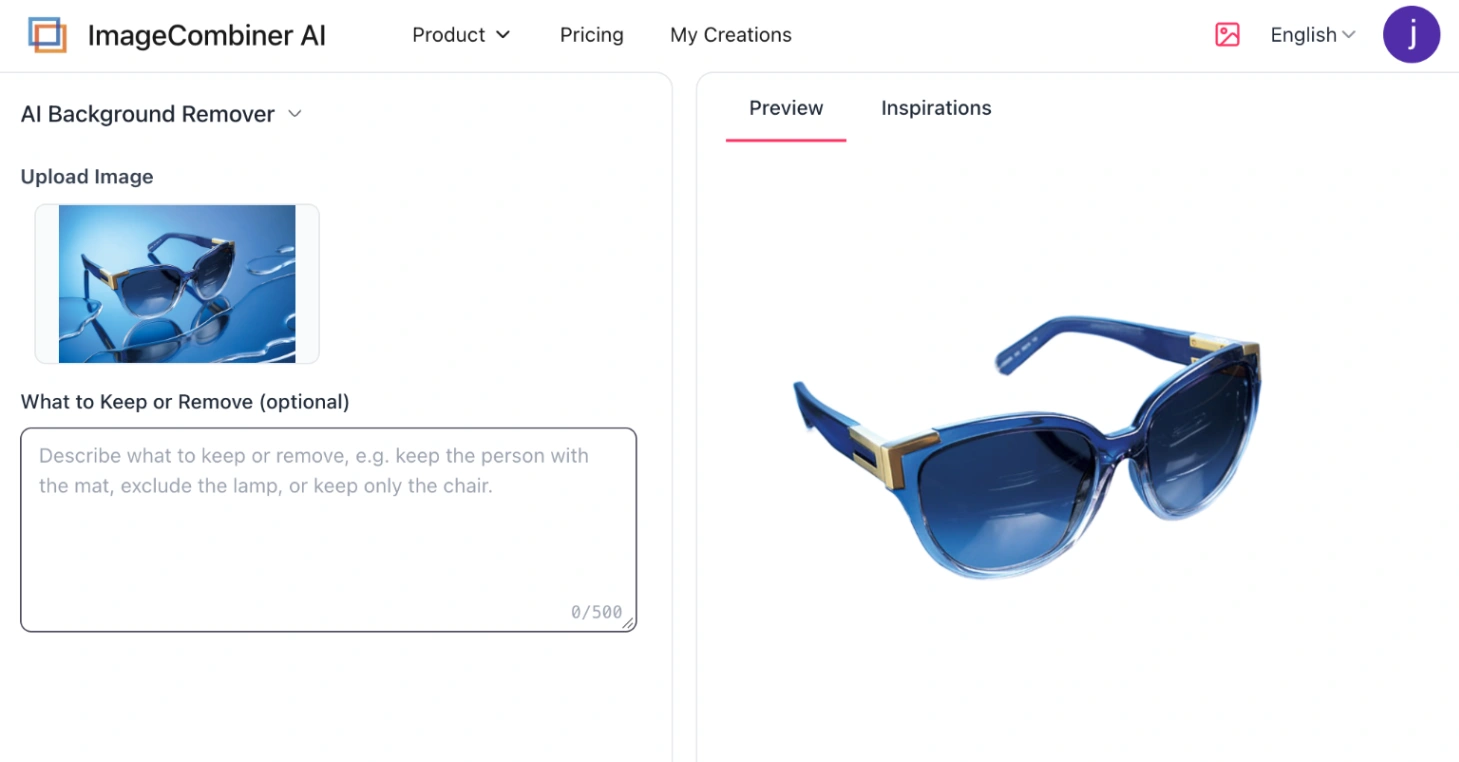
(Result from ImageCombiner AI)
- Observation: In this test, the platform separated the physical frame from the tabletop reflections without leaving visible reflection patches beneath either temple arm. The frame margins remained clean and well-defined.
Dealing with reflective glass, jewelry, or water surfaces in your own product catalog? You can test ImageCombiner AI's reflection separation on your images →
Test Case 2: Multi-Subject Isolation via Prompt Guidance
When an image contains multiple coexisting items, automated models must guess user intent. In this indoor yoga studio test, the composition contains a practitioner in a balance pose, a patterned exercise mat, a potted palm, and floor candles.

(Figure 2: Original yoga studio image used to test single-subject extraction and prompt-guided object selection).
Standard tools handled this ambiguity differently:
- Single Person: ImageCombiner AI, Clipdrop, and Picsart isolated only the practitioner. remove.bg also isolated the person alone, though its export resolution was noticeably constrained.
- Person + Props: Adobe Firefly automatically grouped the practitioner, the potted plant, and the floor candles together into the foreground.

(Figure 2A: Default single-subject output from ImageCombiner AI, Clipdrop, and Picsart).

(Figure 2B: Adobe Firefly automatically grouped the person, potted plant, and candles).
Adobe's result is not necessarily incorrect, as the ideal selection depends on project context. However, traditional utilities offer no direct control over what gets kept without tedious manual eraser masking.
Solving Intent with Text Prompts
To isolate specific element combinations without manual brush work, only ImageCombiner AI supports semantic text prompts. Entering the prompt "keep the person with the mat" cleanly preserved both target items while stripping away the surrounding floorboards, potted palm, candles, and walls.
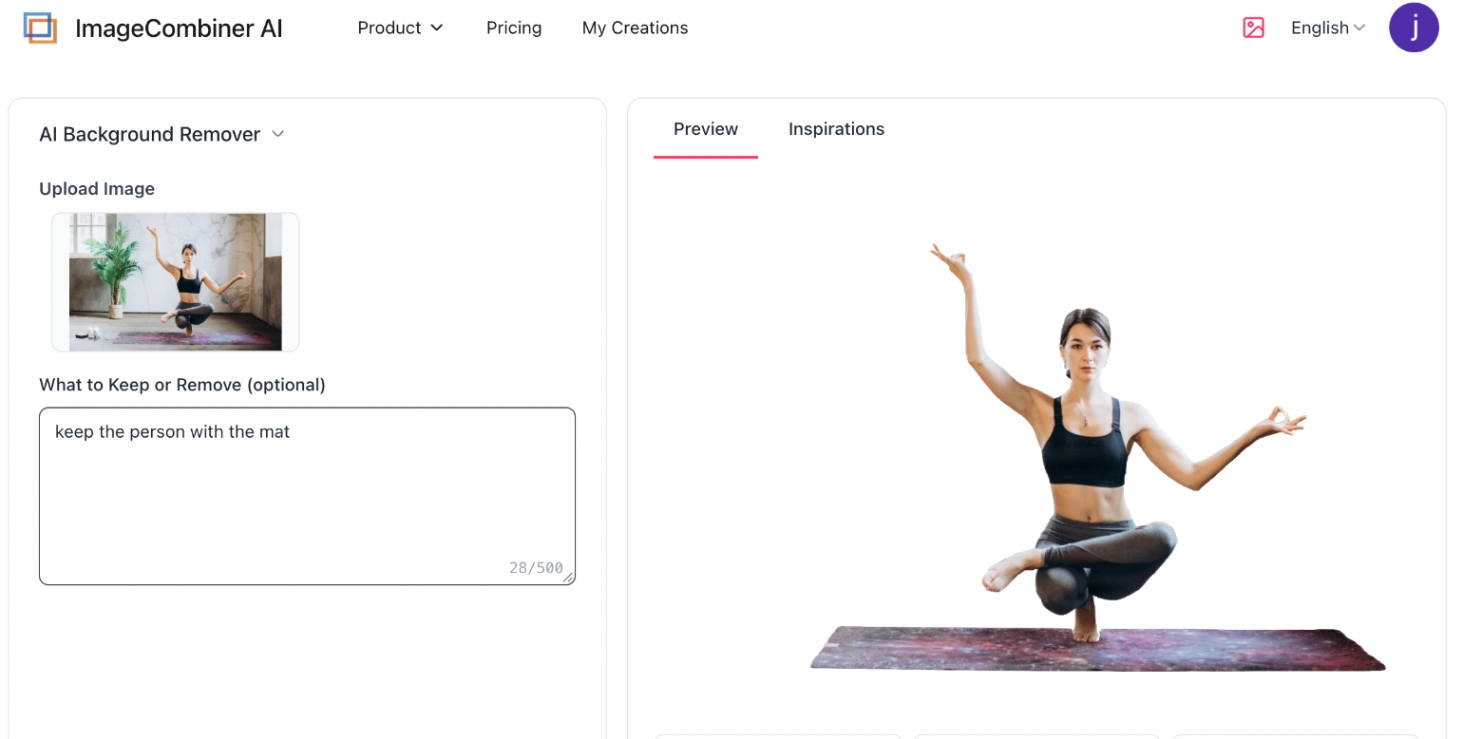
(Figure 2C: ImageCombiner AI extracting both the practitioner and mat based on the text prompt).
Upload your challenging image · Instant preview with natural-language prompts
Remove.bg Alternatives Compared: 2026 Test Results
Looking for free remove.bg alternatives? The table below highlights how each platform balances edge precision, reflection separation, and custom prompt control (results based on our specific test files):
| Tool | Edge Precision | Benchmark Test Summary | Prompt Guidance? | Complex Scene Handling | Best For |
|---|---|---|---|---|---|
| remove.bg (Baseline) | ⭐⭐⭐ | Left residual reflections beneath temple arms and rim; slight edge stepping on zoom | ❌ | Single subject by default; requires manual brush erasing for extra props | Fast, non-reflective everyday drafts ahead of the Canva transition |
| ImageCombiner AI | ⭐⭐⭐⭐⭐ | Fully separated frames from water reflections; smooth anti-aliased borders | ✔️ | High; selectively isolates custom targets via prompt (e.g., person + mat) | E-commerce product photography, reflective items, and prompt-directed cutouts |
| Adobe Firefly | ⭐⭐⭐⭐ | Failed to remove tabletop reflections; strong handling of organic hair and textures | ❌ | Auto-grouped multiple items (person, plant, and candles) into foreground | Creative Cloud subscribers who edit cutouts inside Photoshop |
| Clipdrop | ⭐⭐⭐⭐ | Cleared left reflection, but left visible right reflection artifact unremoved | ❌ | Centered single subject only; no custom isolation options | Quick, minimalist drag-and-drop mockups |
| Picsart | ⭐⭐⭐ | Failed to clean left reflection fragment; softer, feathered outer contours | ❌ | Single subject by default; manual eraser brush and canvas overlays available | Social media graphics, promotional banners, and marketing collages |
The Final Verdict: Which Tool Should You Choose?
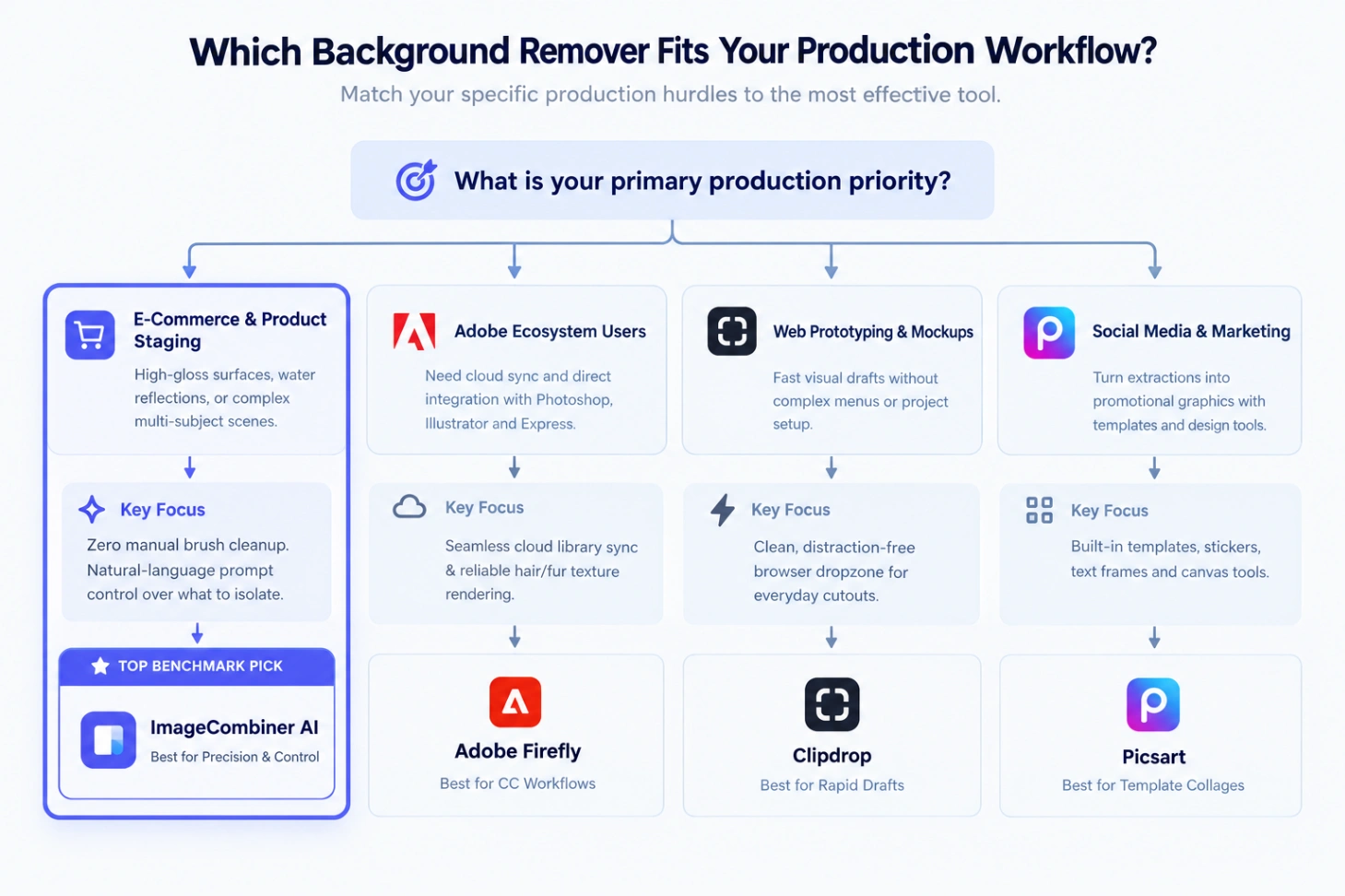 (Figure 3: Matching production priorities to suitable background removal tools).
-
ImageCombiner AI
- The Verdict: The standout performer in our physical benchmarks, cleanly separating complex tabletop water reflections where others left artifacts. Its prompt-guided selection ("keep the person with the mat") eliminates tedious manual eraser masking.
- Best for: E-commerce sellers, commercial product photographers, and teams needing clean, prompt-directed multi-subject cutouts.
-
remove.bg (The Baseline)
- The Verdict: Still the fastest single-click tool for straightforward portraits with mature API support. However, its models struggled with reflective tabletop reflections, and free exports remain limited to small preview sizes ahead of its December 2026 Canva migration.
- Best for: Rapid, non-reflective everyday drafts before the standalone portal retires.
-
Adobe Firefly
- The Verdict: Backed by Adobe's imaging engine, it handles organic textures like hair with high fidelity. In our tests, it grouped contact reflections and peripheral props into the foreground, requiring secondary cleanup in Photoshop.
- Best for: Designers already inside the Creative Cloud ecosystem who prioritize cross-app asset synchronization.
-
Clipdrop
- The Verdict: Offers a clean, minimal browser interface with rapid turnaround times, though its automated detection yielded asymmetrical reflection remnants on our glasses test.
- Best for: Developers and creators looking for fast, uncluttered visual prototyping.
-
Picsart
- The Verdict: Combines automated cutout tools with a rich canvas of stickers, promotional text, and marketing frames, though its softer edge definition is less suited for crisp product catalogs.
- Best for: Social media creators assembling immediate banners, collages, and promotional posts.
Frequently Asked Questions
Why is remove.bg closing its standalone website?
According to the platform announcement, remove.bg is consolidating its background removal experience into Canva. On 1 December 2026 at 9:00am CET, the standalone site will close. Users who prefer dedicated, single-purpose browser tools can use this transition window to evaluate the best remove.bg alternatives.
Why do background removers sometimes retain tabletop reflections?
Automated segmentation tools identify boundaries based on contrast, color transitions, and edge definitions. When an object rests on a polished surface, the cast reflection mirrors the color, tone, and physical contour of the product itself. Because these pixels closely resemble the physical subject, algorithms often interpret the reflection as part of the foreground.
How does prompt guidance assist with complex scenes?
Standard background removers apply unguided detection across the entire image. In scenes containing several items (such as the yoga studio test featuring a person, a mat, and room props), the model must guess which elements to isolate. Prompt guidance allows users to input a concise instruction, such as "keep the person with the mat", directing the model to extract the intended objects without relying on a manual eraser brush.
Does the ImageCombiner AI tool require an account?
Yes, using the platform requires an account login. New accounts receive trial credits to test image processing, reflection separation, and prompt-guided selection on their own files before choosing ongoing credit options.
Conclusion
While basic cutouts are straightforward, finding a reliable remove.bg alternative that handles polished tabletop reflections, water refractions, and complex multi-object compositions without manual masking remains the real production challenge.
Instead of settling for automated tools that leave reflection artifacts behind, put ImageCombiner AI to the test. Upload your most demanding e-commerce or lifestyle image, and see how prompt guidance and reflection separation perform on your own workflow.
Free trial credits included · Built for commercial product photography
Editorial Disclosure: This benchmark was conducted by the team behind ImageCombiner AI using the test images and results shown above. The comparison reflects our hands-on testing of these specific images, and results may vary depending on lighting, contrast, materials, and subject complexity. We encourage readers to test each tool with images from their own workflows.